Scheduled Jobs Migration for Anthology Cloud
This information applies to the Anthology Cloud system. If you have the on-premise version, the information in this section is not applicable.
In Anthology Student versions before 21.0, the SQL Server Agent was used to configure scheduled and recurring processes. These processes are an integral part of Anthology Student. Examples of scheduled jobs are Populate Audit tables, Refresh Dynamic Student Groups, Purge History tables, and Process Status Changes.
A full list of the jobs deployed with Anthology Student version 21.0 and higher is included at the end of this topic.
Conditional Deployment – Database Jobs Scripts
All the existing SQL Job scripts use a standard stored procedure, cmc_CreateJob to set up the scheduled jobs. In Anthology Student version 21.0 and higher, logic within the stored procedure determines whether the deployment is within the campusnexus.cloud domain or the database is an Azure SQL database. When either is true, scheduled jobs will be added to the SQL database table core.ScheduledJobs.
The Background Processing system uses this table to schedule the jobs. Otherwise, the jobs are created within the SQL Server Agent just as they were in prior versions.
Upgrade Scenarios – From Anthology Student 20.0 to 21.0
There are various upgrade paths in Anthology Student version 21.0. The location of the scheduled jobs will depend on the environment in which version 21.0 is deployed.
Version 20.0 On-Premise
-
Upgrade to Version 21.0 staying On Premise: Scheduled Jobs will continue to be deployed to SQL Server Agent.
-
Upgrade to Version 21.0 and migrate to campusnexus.cloud: Scheduled Jobs will be deployed to the Anthology Student Background Processing scheduled jobs table.
-
Upgrade to Version 21.0 private (not campusnexus.cloud) Azure subscription using full SQL Server: Scheduled Jobs will continue to be deployed to SQL Server Agent.
Version 20.0 on campusnexus.cloud
- Upgrade to Version 21.0 on campusnexus.cloud: Scheduled Jobs will be deployed to the Anthology Student Background Processing scheduled jobs table.
Version 20.0 on any environment to any Azure subscription with Azure SQL database
Scheduled Jobs will be deployed to the Anthology Student Background Processing scheduled jobs table.
Database Tables
The tables for scheduled jobs exist within the core schema in the Anthology Student database.
core.ScheduledJob
This table holds all the scheduled jobs. Scheduled jobs may be used to execute SQL stored procedures, services, or workflows within Anthology Student. Most jobs have been migrated as SQL stored procedures (SQL). Three jobs need more complex logic and are implemented as services (SVC). The remaining columns identify the stored procedure or the service to be executed and the schedule. The schedule column: JobFrequency is a cron string. The 5 parts of the string are delimited by a space.
The format is: MINUTE HOUR DAY-OF-MONTH MONTH DAY-OF-Week
Examples:
*/30 * * * *
|
Every 30 minutes
|
*/5 * * * *
|
Every 5 minutes
|
0 */6 * * *
|
Every 6 hours
|
40 2 * * *
|
Every day at 2:40 AM
|
30 2 28 * *
|
28th of each month, at 2:30 AM
|
0 2 * 1-7 0
|
First Sunday of each month, at 2:00 AM
|
core.ScheduledJobHistory
ScheduledJobHistory contains a log of each time that a scheduled job has been executed. The results of the process are recorded within this table.
JobState indicates the current state of the job; Started, Succeeded, or Failed. JobResult holds the return code or output from the stored procedure, or the error message if the state fails.
The ScheduledJobHistory table is purged every 6 hours by the scheduled job, Cleanup Scheduled Job History.
This job executes a SQL stored procedure: core.sproc_System_Cleanup_ScheduledJobHistory 1000,20,4 Parameters default values:
-
1000 is the maximum number of entries
-
20 indicates the maximum number of entries per job type
-
4 indicates the maximum age of a history entry – in weeks
Migrating Custom SQL Jobs to Hangfire
If you have custom SQL jobs, you must migrate to Hangfire jobs. Please contact Anthology Professional Services.
Hangfire Recurring Jobs
The core.ScheduledJob table is the source of the job scheduling. At the start of Anthology Student, the background processing system reads this table to configure the recurring jobs within Hangfire. The recurring jobs can be viewed within the Hangfire Dashboard.
<sitename>/BackgroundJobs/recurring
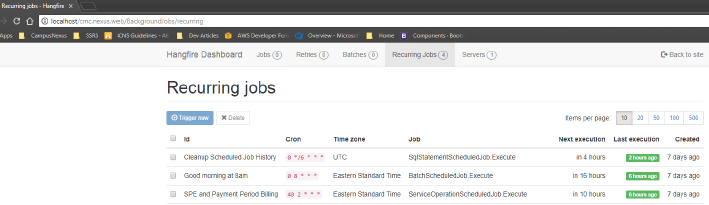
This BackgroundJobs page is disabled by default. It can be enabled by modifying an application setting.
The app setting key is AllowHangfireDashboard – with a value of True.
Application Startup Logic
Core.ScheduledJob table is processed and for each row, a recurring job is added or updated within the Hangfire system. When jobs are deleted from the core.ScheduledJob table, they are not physically deleted but are instead marked as IsDeleted = true (1).
This allows the startup process to remove a recurring job from Hangfire when it is no longer needed. This logic is run by the Background Processing system each time that the Student Web App starts. It can also be triggered by selecting the Reset Service menu option from within the Scheduled Jobs page within the UI.
Concurrent Execution
Most processes started by a scheduled job will be completed in a matter of seconds. But some will run for a longer period. If the job executes past its next scheduled start time, the next occurrence will be canceled.
A log entry will be added to the job history table indicating that it was canceled: "Another instance of jobname is already executing." This same concurrency checking applies when the application service is scaled out to multiple instances. In the scaled-out environment, the Background Processing system is also executing on each instance. Concurrency checking prevents the execution of more than one instance of a scheduled job.
Triggering Scheduled Event Workflows
To trigger a workflow based on a Scheduled Event, use the Scheduled Job type of Workflow. Enter the schedule name in the Workflow Schedule Entity Name text box. This value is to be checked in your Scheduled Event workflow to indicate if the workflow should execute.
Using this type of scheduled job removes the need to add SQL Jobs to execute workflows.
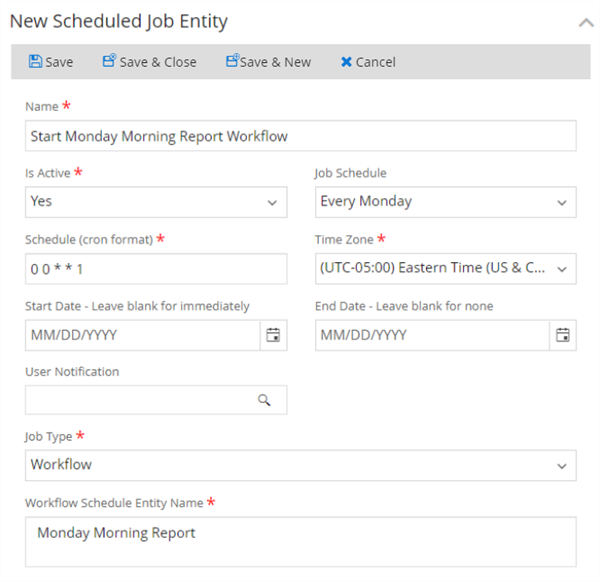
Scheduled Jobs in the Anthology Student User Interface
Refer to Background for Scheduled Jobs in Anthology Student.
